
Did you like the tool?
Did we solve your problem?
Rate the tool
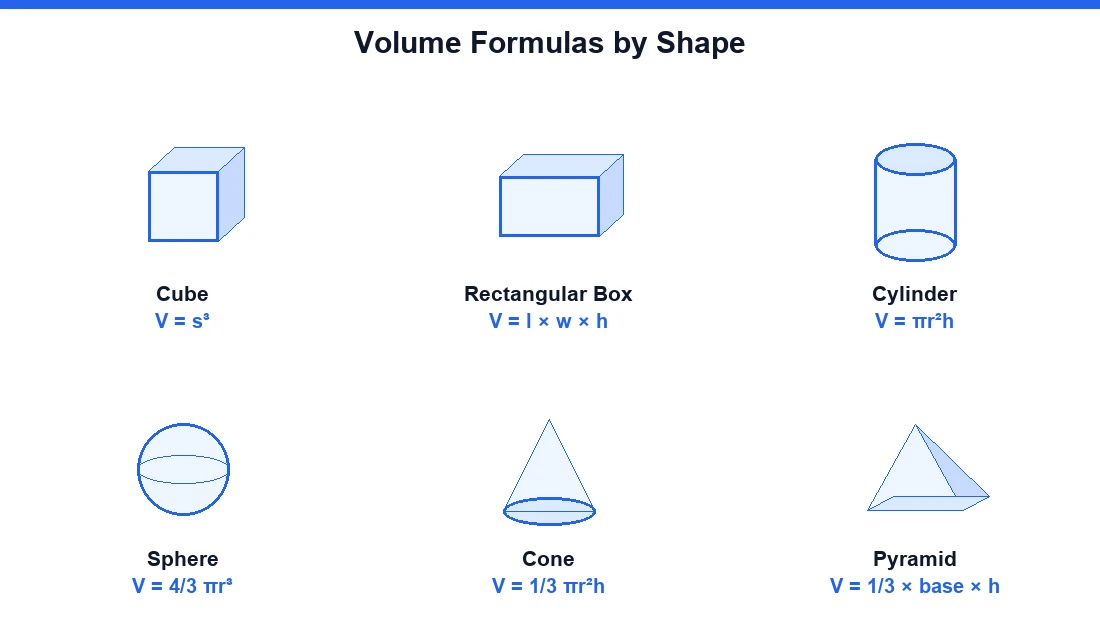
Use the Volume Calculator above to work out the volume of any common 3D shape — a cube, rectangular box, sphere, cylinder, cone, pyramid, or triangular prism — in seconds. Enter your measurements, pick your shape, and the tool returns the result in whatever unit you need: cubic inches, cubic feet, cubic meters, cubic yards, gallons, or liters. Below the calculator you'll find every volume formula, worked examples, and shape-by-shape guidance so you understand exactly where the numbers come from.
Whether you're sizing a swimming pool, ordering concrete, filling an aquarium, or just checking homework, this page covers it.
What is volume?
Volume is the quantification of the three-dimensional space a substance or object occupies. It answers a simple question — "how much space is inside this thing, or how much will fit?" — and it's measured in cubic units. The SI unit for volume is the cubic meter (m³), but in everyday use you'll also see cubic inches, cubic feet, and cubic yards for solids, and liters, milliliters, fluid ounces, cups, gallons, and barrels for fluids.
It helps to separate volume from area. Area measures a flat, two-dimensional surface; volume measures the three-dimensional space enclosed by a shape. That distinction is why there's no such thing as the "volume of a rectangle" — a rectangle is flat. You can only find the volume of a box, which is the solid a rectangle turns into once it has depth. For a container, the figure people usually care about is capacity: how much fluid it can hold, rather than how much space the container itself displaces.
You can find the volume of an object two ways: measure the liquid it displaces, or measure its dimensions and apply the formula that matches its shape. Most everyday objects have well-defined formulas. More complicated objects can be broken down into simpler shapes, and their volumes summed. For anything that doesn't fit a known equation, volume can be estimated with calculus or numerical methods — or, if the density of the material is known and uniform, derived from its weight.
✓ Quick value: Use this page after running the tool to compare shapes, test different sizes, and confirm a container has enough capacity before you spend money on materials or transport.
How to use the Volume Calculator
The tool is built to be fast:
- Select your 3D shape — cube, box, cylinder, sphere, cone, pyramid, or triangular prism.
- Enter the required dimensions into the fields. A cylinder needs a radius (or diameter) and a height; a box needs length, width, and height.
- Keep every measurement in the same unit. Mixing inches and feet is the single most common cause of wrong answers.
- Read your result in cubic units, and switch units with a click if you need gallons or liters instead.
One practical note on inputs: some calculators ask for the radius, others for the diameter. In the real world the diameter of a circular base is easier to measure accurately, because you don't have to find the exact center. If you have one, the other is simple — the radius is always half the diameter.
Simple flow
Shape selected → dimensions entered → same unit kept → formula applied → result shown clearly
Volume formulas by shape
Every calculation below assumes all your measurements are in the same unit, and every result comes out in cubic units. Here are the volume formulas for the most common shapes, followed by how each one works.
Cube volume calculator
A cube is the simplest case. Because every side is equal, you only need one measurement — the side length — and you cube it. The cube volume formula is V = a³. It's the same as multiplying the area of one face by the depth of the cube, which for a cube is just the side length again. For a shape this regular, you barely need a calculator, but the tool keeps your units clean.
Rectangular box / prism volume calculator
To find the volume of a box, multiply length × width × height. All three dimensions are easy to measure because each side is a rectangle. Practically, multiply two sides to get the base area, then multiply by the depth or height. This is the go-to calculation for shipping cartons, rooms, storage bins, and rectangular tanks — anything with flat sides and right angles.
Cylinder volume calculator
A cylinder needs two measurements: the height and either the radius or the base diameter. The volume of a cylinder formula is V = πr²h — the area of the circular base (πr²) multiplied by the height. Cylinders show up everywhere: pipes, columns, tubes, water tanks, and cans. If you'd rather enter the diameter, the calculator handles the conversion to radius for you.
Sphere and hemisphere volume calculator
A sphere is the three-dimensional counterpart of a circle — the set of points equidistant from a center point, with the distance to the surface being the radius. You only need one measurement, the radius or the diameter, since the diameter is twice the radius. The formula is V = (4/3)πr³, which can also be written as 4/3 × π × (d/2)³. A hemisphere is exactly half of that, so the hemisphere volume calculator simply halves the sphere result.
Cone volume calculator
A cone tapers smoothly from a circular base up to a single point called the apex. The volume of a cone is V = (1/3)πr²h, where r is the base radius and h is the height — precisely one-third of a cylinder with the same base and height. Note that this applies to a right circular cone; irregular or oblique cones also require the cone's angle and aren't handled by a basic tool.
Pyramid volume calculator
Like the cone, a pyramid is one-third of the "box" it fits inside. The volume of a pyramid is V = (1/3) × base area × height. Find the area of the base first — square, rectangular, or triangular — then multiply by the height and divide by three. A triangular pyramid (tetrahedron) uses a triangular base area in the same formula.
Triangular prism volume calculator
A triangular prism is a triangle extended along a length. Its volume is V = ½ × base × height × length — you calculate the area of the triangular face, then multiply by how far it runs. As with a box, you only need three measurements: the triangle's base and height, plus the prism's length.
Complex figures that don't match any single shape can usually be decomposed into a sum of these basic shapes. Split the object into cubes, cylinders, and cones, calculate each, and add the volumes together. For unit handling, international measurement practice follows the SI system maintained by the International Bureau of Weights and Measures (BIPM), which is why a properly built Volume Calculator aligns its cubic units and conversions with recognized metric conventions.
Volume calculator for real-world projects
Volume calculations aren't just for the classroom. They're used constantly in construction and planning, cargo and freight, HVAC and air-conditioning sizing, pool management, landscaping, and manufacturing. Here's how the calculator maps to common projects.
🏊 Pools & water: Size chemical dosing and backup storage in gallons or liters.
🛢️ Tanks & pipes: Estimate capacity of cylindrical tanks, drums, and pipe runs.
🌱 Landscaping: Work out soil, mulch, and gravel in cubic yards or tonnes.
Pool volume calculator
Getting pool volume right matters for chemical dosing — too little treatment leads to unsafe water. For a rectangular pool, use length × width × average depth. For a round or above-ground pool, treat it as a cylinder: πr²h. Once you have the volume, convert to gallons or liters to size your chemicals. A swimming pool volume calculator is really just the box and cylinder formulas with a unit switch to gallons.
Tank and water volume calculator
For a full tank, the total volume of a cylinder-shaped tank is πr²l — the circular end area times the length. This works for water tanks, oil tanks, and fuel storage. Because tank calculations assume exact geometric shapes and inside dimensions, treat the results as close estimates rather than exact fills.
Pipe and column volume calculator
Pipes, tubes, and columns are cylinders, so the volume of a pipe uses πr²h with the pipe's inner radius and its length. This is handy for estimating how much water a run of pipe holds, or how much a column will take in gallons — a pipe volume calculator with a gallons output does exactly this.
Aquarium and fish tank volume calculator
Aquariums are usually rectangular, so an aquarium volume calculator uses length × width × height and then converts to gallons or liters. Knowing the true water volume helps you stock fish correctly and dose treatments safely.
Soil, dirt, and landscaping volume
For landscaping materials — mulch, topsoil, gravel, decorative rock, or compost — calculate the volume of the area you're filling (length × width × depth), then convert to cubic yards. Where a product is sold by the tonne, multiply the volume by that material's conversion rate to get the tonnage. Homeowners routinely underestimate how much material they need, so a quick soil or dirt volume calculation prevents both over-ordering waste and under-ordering delays.
Pond and well volume calculator
A pond is estimated by breaking it into simple shapes — a rough box or cylinder with an average depth — then summing. A round well is a straightforward cylinder: πr²h, using the water depth as the height. Both convert cleanly to gallons for stocking or treatment.
Units of volume and conversions
Volume always comes out in cubic units, but real projects often need a different unit than the one you measured in. The most common conversions are cubic feet to gallons and cubic meters to liters — useful whenever you're sizing tanks by hand. The calculator handles these instantly, and if you need to move between area and volume units in more detail you can use our Area and Volume Converter.
One conversion that trips people up: turning weight into volume (or the reverse), such as grams to cups. That's not a straight unit swap. It depends on the density of the substance, so you need to know the specific material or ingredient before you can convert. A cup of flour and a cup of water weigh very different amounts.
💡 Interpretation tip: 0.5 m³ can sound small, but it equals 500 liters. Test the same shape in centimeters and meters once to confirm your unit awareness — it's a simple way to catch conversion mistakes before you buy or build.
Tank volume by fill level
Total capacity is only half the story for tanks — often you want the filled volume at a particular fill height, expressed in gallons and liters. This is more involved than the basic formula.
For a horizontal cylinder tank, the filled portion is found with the circular-segment method rather than a simple πr²l. If the fill height is below the halfway point, you measure the filled segment directly; if it's above halfway, you calculate the empty segment and subtract it from the total. Vertical oval tanks are treated as two half-cylinders separated by a rectangular section, and capsule tanks combine a cylinder with a spherical cap on each end. Because these assume perfect geometric solids and inside dimensions, real-tank results are estimates.
Special and compound shapes
Beyond the common seven, dedicated tools cover shapes like the capsule, spherical cap, conical frustum (a cone with the tip sliced off), and ellipsoid. These extend coverage to objects that don't fit the basic set. And when an object still won't match a formula, the reliable fallback is decomposition: break it into shapes you can calculate, find each volume, and add them up.
Frequently asked questions
How do you calculate volume?
There's no single formula — it depends on the shape. Choose the shape, plug the required dimensions (all in the same unit) into its formula, and read the result in cubic units. For a box that's length × width × height; for a cylinder it's πr²h. Complex objects can be split into basic shapes and summed.
What is the unit of volume?
The SI unit is the cubic meter (m³). Solids are commonly measured in cubic inches, cubic feet, cubic centimeters, and cubic yards, while fluids use liters, milliliters, fluid ounces, cups, gallons, and barrels.
What is the difference between area and volume?
Area measures a two-dimensional surface; volume measures three-dimensional space. That's why there's no volume of a rectangle — only the volume of a box. A rectangle is flat, so it has area but no volume until it gains depth.
How do I find the volume of a box?
Multiply length × width × height. Each side of a box is a rectangle, so all three dimensions are easy to measure, and the product gives you the volume directly.
Can I convert volume to weight?
Not with a plain unit conversion — you need the material's density. If the density is known and uniform, weight and volume convert directly. This is why a weight-to-volume conversion like grams to cups always depends on the specific ingredient.
Does the calculator handle irregular or oblique cones?
No — the tool covers right circular cones. Irregular or oblique cones also require the cone's angle, which a standard volume calculator doesn't ask for.
Why does the calculator ask for diameter instead of radius?
Because in real-world measuring, the diameter of a circular base is easier to measure than the radius — you don't have to locate the exact center. The radius is simply half the diameter, so either input works.
How accurate are tank fill-volume results?
They're estimates. The calculations assume perfect geometric solids and inside dimensions, and real tanks may have features that aren't accounted for, so use the numbers as close approximations.
How do I convert calculated volume into tonnes of material?
Calculate the volume first, then multiply by the product-specific conversion rate for that material. Landscaping suppliers publish these rates because bulk products like gravel and soil are often sold by the tonne rather than by volume.
Explore more calculation tools and important disclaimer
If you often work with measurements, dimensions, and geometry, you may also find other tools in our Math Calculators category useful, along with our Area and Volume Converter for switching between cubic and area units. Using related tools together helps you move from raw dimensions to smarter planning, better budgeting, and faster checks.
Disclaimer: This Volume Calculator is provided for general estimation, educational support, and planning purposes. Results depend on correct shape selection, consistent units, and accurate dimensions entered by the user. For safety-critical, contractual, manufacturing, scientific, or regulated engineering applications, calculations should be independently reviewed and verified against project requirements, applicable drawings, and relevant international standards before use.