
RPM to Speed Calculator
This RPM to Speed Calculator converts rotational speed into linear surface speed for wheels, rollers, pulleys, fans, and conveyors. Build multiple scenarios, compare them live, test unit conversions instantly, and copy or share fully restorable results.
Common Presets for the RPM to Speed Calculator
Choose a preset to load practical starting values into the active scenario. Presets only affect the currently active scenario.
Input Scenarios
Create up to 6 scenarios to compare RPM, diameter, gear ratio, and slip assumptions. Each valid scenario updates the Live Results section automatically.
Live Results
| Scenario | RPM | Diameter | Effective RPM | Speed (m/s) | Speed (km/h) | Speed (mph) | Speed (ft/min) | Status |
|---|---|---|---|---|---|---|---|---|
| Enter values to see live RPM to speed results. | ||||||||
Summary and Interpretation
Visual Comparison
Insights
Recommendations
Copyable Result Summary
Use this summary for design discussions, maintenance reviews, calculations logbooks, or internal sharing.
Formula Section
Base Formula
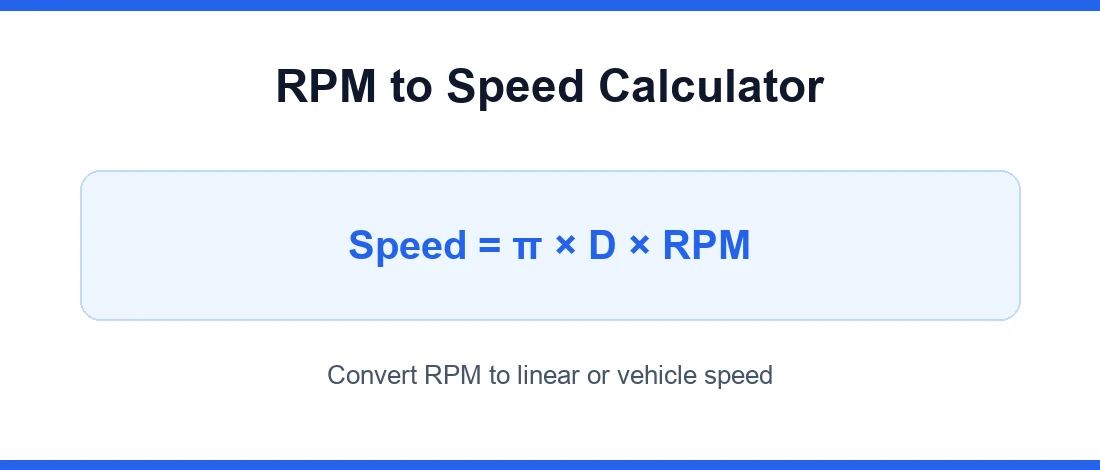
Linear speed (m/s) = π × Diameter (m) × Effective RPM ÷ 60
Effective RPM
Effective RPM = RPM × Gear Ratio × (1 − Slip ÷ 100)
Unit Conversions
km/h = m/s × 3.6, mph = m/s × 2.23694, ft/min = m/s × 196.8504
Typical Use
This RPM to Speed Calculator is useful for wheels, rollers, conveyors, pulleys, shafts, and fan tip velocity checks.
Preview
Did you like the tool?
Did we solve your problem?
Rate the tool
Why the RPM to Speed Calculator is Useful
The RPM to Speed Calculator is useful because rotational motion by itself does not tell you how fast an object is really traveling across a surface. A motor may run at 1,800 RPM, 3,000 RPM, or 6,000 RPM, but the actual linear speed depends on wheel diameter, roller size, pulley dimensions, gear ratio, and slip. The RPM to Speed Calculator turns those engineering inputs into a speed value you can use immediately for design checks, troubleshooting, production planning, and daily workshop decisions.
This matters in garages, factories, field installations, conveyor systems, machine shops, and even hobby projects. If you are selecting a motor for a conveyor, checking the travel speed of a wheeled assembly, estimating vehicle test bench output, or verifying whether a driven roller is operating within a safe range, the RPM to Speed Calculator removes guesswork. Instead of manually converting circumference and rotational speed every time, you can test multiple scenarios in seconds and compare results with confidence.
💡 Practical value: The RPM to Speed Calculator is especially helpful when you want to see how a small change in diameter, RPM, or ratio affects final speed before buying parts or changing machine settings.
What the RPM to Speed Calculator Does
The RPM to Speed Calculator converts rotational speed into linear speed. In simple terms, it answers a practical question: “If this shaft, wheel, tire, drum, or roller rotates at this RPM, how fast is the outer surface moving?” The tool usually takes RPM, diameter, and optional correction inputs such as gear ratio and slip. It then converts the circular motion into distance traveled per minute, second, hour, or other selected unit.
A good RPM to Speed Calculator also helps you switch between unit systems without reworking the math yourself. That is important when one project uses millimeters and meters per second while another uses inches and miles per hour. For users working with international drawings and procurement data, this is valuable because many specifications follow SI quantity conventions aligned with ISO 80000 usage, while field equipment data may still be listed in imperial units.
If you want to explore more tools for design work and field calculations, visit our engineering calculators category.
How the RPM to Speed Calculator Works
The RPM to Speed Calculator works by combining rotational frequency with circumference. Every full revolution moves the outer edge of a wheel or roller by one circumference. If the circumference is larger, each revolution covers more distance. If RPM is higher, that distance is covered more often in the same time. The tool multiplies these effects and then applies any gear ratio or slip correction entered by the user.
⚙️ Basic flow
Because the RPM to Speed Calculator is instant, it encourages comparison. You can test a smaller wheel versus a larger wheel, or compare direct drive against a reduction stage, and immediately see how the speed changes. That is much faster than repeating manual steps on paper or in a spreadsheet.
RPM to Speed Calculator Formula and Calculation Logic
At its core, the RPM to Speed Calculator uses the circumference of the rotating part. The standard relationship is:
Since circumference equals π × diameter, the logic becomes:
If a gear ratio is present, the output RPM may be calculated first. For a simple reduction setup, output RPM is commonly estimated as input RPM divided by gear ratio. If slip exists, actual speed is lower than theoretical speed, so the RPM to Speed Calculator reduces the result by the slip percentage. This is useful for tires, belts, and real mechanical systems where perfect transfer does not occur.
For unit discipline, engineers should keep input dimensions consistent and convert the final answer carefully. This is one reason the RPM to Speed Calculator is more reliable than casual mental math. For general guidance on SI units and quantity handling, the NIST SI resource is a useful reference: NIST Guide to SI units.
How to Interpret RPM to Speed Calculator Results
After using the RPM to Speed Calculator, interpret the result in context. A high speed value may be acceptable for a polishing wheel but unsafe for a conveyor or test fixture. A low speed value may be ideal for torque-heavy movement but inefficient for throughput. The output is not just a number; it tells you whether your chosen RPM, diameter, and ratio meet the operating target.
- Check the unit: m/s, km/h, ft/min, and mph can look very different.
- Compare theoretical and actual values: if slip is included, use the corrected result for real-world planning.
- Review operating limits: bearing speed, surface wear, noise, and safety guards may depend on final speed.
- Test multiple conditions: the RPM to Speed Calculator is best used as a comparison tool, not only a one-time calculator.
Practical Examples and Real-Life Use Cases for the RPM to Speed Calculator
The RPM to Speed Calculator has wide practical use. In a workshop, you may need to estimate how fast a rubber drive wheel moves material. In an industrial plant, you may need to verify conveyor surface speed after changing motor RPM. In a commercial machine, you may want to compare pulleys before ordering replacement parts. At home, a DIY builder may use the RPM to Speed Calculator to predict the travel speed of a custom cart or project vehicle.
Example: suppose a roller has a diameter of 120 mm and rotates at 900 RPM. The RPM to Speed Calculator quickly shows whether the surface speed matches the desired feed rate. Now change the diameter to 150 mm or apply a 2:1 reduction and compare. This is where the tool becomes dynamic and helpful. Instead of recalculating everything manually, you can explore options until the result fits your process target.
🔍 Try this on the page: Use the RPM to Speed Calculator three times with the same RPM and three different diameters. Then repeat with the same diameter and three different gear ratios. You will immediately see which variable has the stronger effect in your application.
RPM to MPH: a quick reference chart
People often search for a specific figure like “3000 RPM to MPH.” The exact answer depends entirely on your tyre size and gearing, but for a typical passenger car in top gear — roughly 26-inch tyres and a combined top-gear-and-final-drive ratio near 3.0:1 — the relationship looks like this:
| Engine RPM | Approx. speed (MPH) |
|---|---|
| 1000 | 26 |
| 2000 | 51 |
| 3000 | 77 |
| 4000 | 103 |
| 5000 | 128 |
| 6000 | 154 |
| 7000 | 180 |
That is about 0.026 MPH for every 1 RPM in this example. Change any part of the drivetrain and the numbers move: taller tyres or a numerically lower final-drive ratio raise the speed at a given RPM, while shorter tyres or a taller gear lower it. That is why a sports car might sit at 3,000 RPM at 80 MPH while a loaded truck is at 3,000 RPM and only 55 MPH — so plug your own tyre diameter and gear ratio into the calculator for an exact figure.
The relationship runs both ways. To convert MPH to RPM, divide instead of multiply: at 60 MPH in the example above, engine speed is roughly 60 ÷ 0.026 ≈ 2,300 RPM.
Common Mistakes to Avoid When Using the RPM to Speed Calculator
Many wrong answers come from simple input mistakes, not from the RPM to Speed Calculator itself. Users sometimes enter radius instead of diameter, mix inches with millimeters, forget to apply ratio direction correctly, or ignore slip in traction-based systems. Another common mistake is reading a theoretical surface speed as if it were guaranteed real output under load.
To avoid errors, confirm the dimension type, confirm the selected units, and check whether the RPM is input speed or output speed. The RPM to Speed Calculator saves time, but accurate inputs still matter. When used carefully, it helps reduce cost, improve efficiency, and support better engineering and operational decisions compared with manual calculation alone.
Frequently Asked Questions
What is an RPM to Speed Calculator?
An RPM to Speed Calculator is a tool that converts rotational speed in revolutions per minute into linear speed using the diameter of a wheel, roller, pulley, or similar rotating part. It helps users quickly estimate travel or surface speed without manual calculation.
How does the RPM to Speed Calculator work?
The RPM to Speed Calculator works by multiplying RPM by the circumference of the rotating component. It can also factor in gear ratio and slip to provide a more realistic output speed for practical applications.
What formula does the RPM to Speed Calculator use?
The RPM to Speed Calculator is based on the formula: linear speed = RPM × circumference. Since circumference = pi × diameter, the tool typically uses RPM × pi × diameter, then converts the result into the selected speed unit.
Who should use an RPM to Speed Calculator?
An RPM to Speed Calculator is useful for engineers, mechanics, technicians, workshop users, conveyor designers, machine operators, students, and DIY builders who need to convert rotational motion into actual linear speed.
Can the RPM to Speed Calculator estimate torque, power, or current?
No. The RPM to Speed Calculator is designed to calculate linear speed from RPM and diameter-related inputs. It does not directly estimate torque, power, current, load, or energy unless those values are handled by a separate tool.
Can the RPM to Speed Calculator be used for real-life applications?
Yes. The RPM to Speed Calculator can be used for practical scenarios such as checking conveyor speed, wheel travel speed, roller surface speed, pulley-driven systems, motor-driven assemblies, and other workshop or industrial applications.
Why is the RPM to Speed Calculator useful compared with manual calculation?
The RPM to Speed Calculator saves time, reduces conversion errors, and makes it easier to test different diameters, RPM values, gear ratios, and slip conditions. It is especially useful when comparing multiple design or operating scenarios quickly.