
Did you like the tool?
Did we solve your problem?
Rate the tool
Free GST Calculator Online (Inclusive & Exclusive)
Calculating the Goods and Services Tax should not feel like accounting homework. Whether you are preparing an invoice, checking a supplier bill, comparing tax-inclusive pricing, or reversing a tax-added total to find the original value, this Calculator helps you get a fast and clean answer. It is useful for shop owners, freelancers, service providers, procurement teams, finance staff, and everyday buyers who want clarity before they pay or issue an invoice.
The biggest advantage of a good tax Calculator is confidence. Instead of estimating mentally or building spreadsheet formulas every time, you can verify the taxable value, the GST amount, and the final payable figure in seconds. That reduces billing mistakes, improves recordkeeping, and saves time during routine transactions.
How to Use This Online GST Calculator
- Choose Calculation Mode:
- Add GST (Exclusive): Use this when you know the base price and want the final amount after tax.
- Remove GST (Inclusive): Use this when you already have the total paid amount and want to extract the tax and original price.
- Enter the Amount: Type the taxable value or the gross value, depending on the selected mode.
- Select the GST Rate: Choose a standard slab or enter a custom percentage if your region or transaction needs it.
- Review the Breakdown: The GST Calculator instantly shows the base price, tax amount, gross amount, and where relevant, the split between CGST and SGST.
Why a GST Calculator Is Useful in Daily Financial Work
A GST Calculator is not just for accountants. It is helpful anywhere pricing, invoicing, budgeting, or tax comparison is involved. In retail, it helps verify customer-facing prices. In offices, it helps teams validate supplier quotations and tax-inclusive purchase orders. In commercial environments, it supports faster billing and fewer reconciliation errors. In workshops, warehouses, and field-service operations, it helps staff check whether the invoice value matches the agreed taxable amount before releasing payment.
When the same business handles both tax-inclusive and tax-exclusive pricing, a GST Calculator becomes even more valuable because it prevents confusion between quoted price and final amount. That is especially important for e-commerce sellers, contractors, consultants, and businesses serving both consumers and corporate clients.
💡 Quick tip: Use the GST Calculator twice for the same transaction—first to verify the supplier’s figure, then again to test an alternate tax rate or pricing method. This is a simple way to spot hidden pricing differences before approval.
What the GST Calculator Does
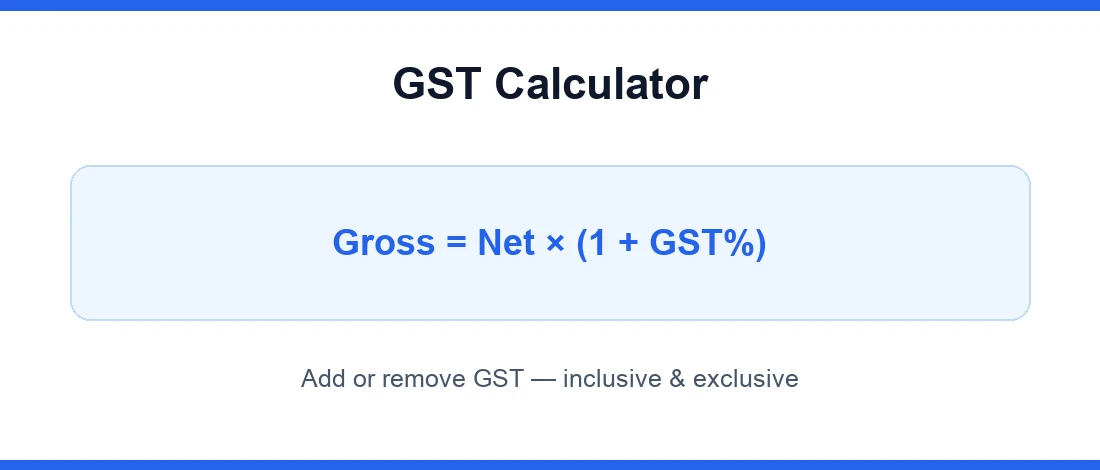
This GST Calculator performs two practical jobs. First, it can add GST to a net amount to produce the final invoice value. Second, it can remove GST from a tax-inclusive amount to find the original taxable base. That means it works for forward pricing and reverse tax extraction.
It also improves visibility. Rather than showing only one number, the GST Calculator gives a structured tax breakdown so users can understand what portion is actual product or service value and what portion is tax. In dual-tax structures, that split is useful for bookkeeping, ERP entry, invoice checks, and audit trails.
How the GST Calculator Works
The logic behind a GST Calculator is straightforward, but using the correct direction matters. If the entered amount is exclusive of tax, the tool multiplies the amount by the GST rate to calculate tax, then adds it to the base. If the entered amount already includes tax, the tool works backward by dividing the gross amount by one plus the tax rate.
This matters because users often make one common mistake: they subtract the GST percentage directly from a tax-inclusive total. That gives the wrong answer. A GST Calculator avoids that error by applying the correct reverse-calculation method.
The Mathematical Formulas Behind the GST Calculator
The formulas used by a GST Calculator are standard tax arithmetic formulas widely used in invoicing and accounting practice:
- To Add GST:
GST Amount = (Original Cost × GST Rate) / 100 - Gross Amount:
Gross Amount = Original Cost + GST Amount - To Remove GST:
Base Price = (Total Amount × 100) / (100 + GST Rate)
From an international tax-policy perspective, value-added tax and GST systems are generally built around destination-based consumption principles, and cross-border guidance is discussed in the OECD International VAT/GST Guidelines. A GST Calculator does not replace legal classification of a transaction, but it does help you apply the numerical side correctly once the applicable rate is known.
How to Interpret GST Calculator Results Correctly
A GST Calculator result becomes useful only when you read it correctly. The base amount is the value before tax. The GST amount is the tax portion. The gross amount is the final amount payable or receivable. If the tool shows CGST and SGST, those are component splits of the total tax and should match the tax treatment of the transaction type.
When comparing quotations, always compare base value with base value and final payable with final payable. A GST Calculator makes this easier by separating the numbers clearly, helping you avoid false comparisons between tax-inclusive and tax-exclusive offers.
Practical Examples and Real-Life Use Cases for a GST Calculator
Example 1: A consultant charges 10,000 at 18% GST. The GST Calculator shows 1,800 as tax and 11,800 as the final invoice amount.
Example 2: A retail customer receives a bill of 5,900 inclusive of 18% GST. The GST Calculator works backward to show the taxable base and the tax already included in the receipt.
Example 3: A procurement officer receives two supplier quotations—one tax-exclusive and one tax-inclusive. The GST Calculator helps normalize both values so the real commercial comparison becomes fair.
These scenarios apply across home purchases, office supplies, commercial contracts, industrial maintenance, service agreements, subscription billing, workshop tools, and spare-part ordering.
Common Mistakes Users Should Avoid When Using a GST Calculator
- Using the wrong mode: Adding GST when the amount is already inclusive gives a wrong total.
- Applying the wrong rate: The GST Calculator is only as accurate as the selected slab or entered percentage.
- Mixing taxable and non-taxable items: Combined billing can distort the result if exempt items are not separated properly.
- Ignoring transaction type: In some jurisdictions, intra-state and inter-state treatment changes the component split.
⚠️ Accuracy note: A GST Calculator gives mathematically correct figures, but product classification, exemptions, zero-rating, place-of-supply rules, and special levies still need professional review where applicable.
Why a GST Calculator Is Better Than Manual Calculation
Manual tax calculation is slow, repetitive, and prone to rounding or logic errors, especially when users switch between inclusive and exclusive pricing. A GST Calculator improves speed, consistency, and decision quality. It helps reduce cost by preventing overbilling, underbilling, rework, and invoice disputes. It also improves efficiency because users can test multiple rates or values in seconds without touching a spreadsheet.
For users exploring other money tools, you can also browse our financial calculators category to compare related budgeting and pricing tools. A reliable GST Calculator is one of the fastest ways to make tax-aware pricing decisions with less guesswork and more confidence.